> For the complete documentation index, see [llms.txt](https://doc.realvirtual.io/llms.txt). Markdown versions of documentation pages are available by appending `.md` to page URLs; this page is available as [Markdown](https://doc.realvirtual.io/components-and-scripts/motion/drive-position-switch.md).
# Drive Position Switch
{% hint style="info" %}
This feature was added in realvirtual **6.0.9 beta**
{% endhint %}
## Overview
The **Drive Position Switch** component controls a boolean PLC signal based on the drive's position. It monitors one or more position ranges and activates an output signal when the drive enters any of these areas. The component fully supports both linear and rotational drives, including drives with wrap-around behavior (e.g., 0-360° rotational drives).
This component is particularly useful for creating position-dependent logic in automation systems, such as activating sensors, triggering actions at specific zones, or creating safe areas on linear or rotational axes.
## Key Features
* **Multiple Position Areas** - Define multiple ranges where the signal should be active
* **OR Logic** - Signal activates when drive is in ANY defined area
* **Area Inversion** - Optionally define areas as "false zones" instead of "true zones"
* **Position Offset** - Apply a global offset to the drive position before checking areas
* **Wrap-Around Support** - Automatic detection and handling of rotational drives with position wrapping
* **Wrapped Areas** - Support for areas that wrap around limits (e.g., 350-10° on a 0-360° drive)
## Properties
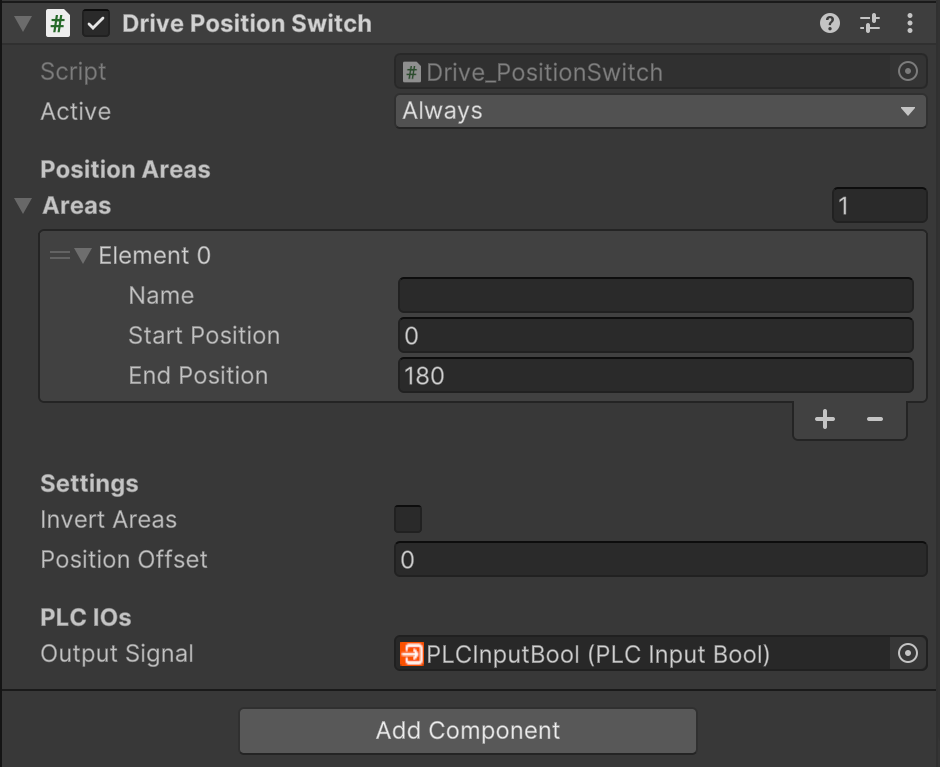
Drive Position Switch Inspector
### Position Areas
**Areas** (list) A list of position ranges that control the output signal. Each area has:
* **Name** - Descriptive name for the area
* **Start Position** - Beginning of the range in millimeters or degrees
* **End Position** - End of the range in millimeters or degrees
When the drive position is within ANY of these areas, the output signal is set to true (OR logic). For rotational drives with wrapping enabled, areas can wrap around the limits by setting Start Position > End Position (e.g., 350-10 on a 0-360° drive).
### Settings
**Invert Areas** (boolean) When enabled, the defined areas become "false zones" instead of "true zones". The output signal is false when inside areas and true when outside all areas. This is useful for defining exclusion zones or safe areas.
**Position Offset** (float) A global offset in millimeters or degrees applied to the drive's current position before checking areas. For drives with wrapping enabled, the offset is automatically normalized to stay within the drive's limits. This allows you to shift all areas without modifying each individual area range.
### PLC IOs
**Output Signal** (PLCInputBool) The boolean signal sent to the PLC. This signal is true when the drive position (after applying offset) is within any defined area, or inverted if Invert Areas is enabled. Connect this to your PLC logic or other components that need position-based triggering.
## Usage
### Basic Position Switch
To create a simple position switch that activates in specific zones:
1. Add a **Drive** component to a GameObject
2. Add the **Drive Position Switch** component to the same GameObject
3. In the Inspector, expand the **Areas** list and click the + button
4. Set **Start Position** and **End Position** for your desired activation zone
5. Add a **PLCInputBool** signal or connect the **Output Signal** to your logic
6. The signal will be true when the drive is within the defined range
### Multiple Zones
To activate the signal in multiple separate zones:
1. Add multiple elements to the **Areas** list
2. Configure each area with different Start and End positions
3. The output will be true if the drive is in ANY of the defined areas (OR logic)
Example: Activate signal at positions 100-150mm and 300-350mm:
* Area 1: Start=100, End=150
* Area 2: Start=300, End=350
### Rotational Drives with Wrap-Around
For rotational drives that jump from upper to lower limit (e.g., 360° to 0°):
1. Ensure your Drive has **Use Limits** enabled and **Jump To Lower Limit On Upper Limit** enabled
2. Create areas that can wrap around limits by setting Start Position > End Position
3. The component automatically detects and handles wrapped areas
Example: Activate between 350° and 10° on a 0-360° drive:
* Area: Start=350, End=10
* Signal will be true from 350° to 360° AND from 0° to 10°
### Safe Zones with Area Inversion
To define safe zones where the signal is false (and true everywhere else):
1. Enable **Invert Areas** checkbox
2. Define areas where you want the signal to be FALSE
3. The output will be true when OUTSIDE all defined areas
Example: Create a safe zone from 100-200mm where output is false:
* Enable Invert Areas
* Area: Start=100, End=200
* Result: Signal is false from 100-200mm, true everywhere else
### Position Offset
Use position offset to shift the coordinate system without modifying all areas:
1. Set **Position Offset** to your desired offset value
2. The drive's position is adjusted before checking areas
3. For wrapping drives, the offset is automatically normalized
Example: Check if drive is at position 0-50mm with 100mm offset:
* Area: Start=0, End=50
* Position Offset: 100
* Result: Signal is true when drive is at -100 to -50mm (adjusted to 0-50mm)
## See Also
* [Drive](/components-and-scripts/motion/drive.md) - The main Drive component
* [Drive Behaviors](/components-and-scripts/motion/drive-behavior.md) - Overview of all Drive Behavior components
* [PLCInputBool](https://github.com/game4automation/doc/blob/doc/components-and-scripts/plc-signals.md#plcinputbool) - Boolean signals to PLC
* [Sensor](/components-and-scripts/sensors/sensor.md) - Alternative for proximity-based detection
---
# Agent Instructions
This documentation is published with GitBook. GitBook is the documentation platform designed so that both humans and AI agents can read, navigate, and reason over technical content effectively. Learn more at gitbook.com.
## Querying This Documentation
If you need additional information that is not directly available in this page, you can query the documentation by asking a question.
Perform an HTTP GET request on the following URL with the `ask` and `goal` query parameters:
```
GET https://doc.realvirtual.io/components-and-scripts/motion/drive-position-switch.md?ask=&goal=
```
`ask` is the immediate question: it should be specific, self-contained, and written in natural language.
`goal` is what the user is ultimately trying to achieve, the reason they need the answer. Sharing it helps GitBook give you a better, more relevant answer. A goal is most helpful when it describes the outcome the user wants rather than restating the question. For example, with `ask=how do I create an API token`, a goal like `automate deployments from our CI pipeline` lets GitBook tailor the answer to that use case.
The response will contain a direct answer to the question and relevant excerpts and sources from the documentation.
Use this mechanism when the answer is not explicitly present in the current page, you need clarification or additional context, or you want to retrieve related documentation sections.