> For the complete documentation index, see [llms.txt](https://doc.realvirtual.io/llms.txt). Markdown versions of documentation pages are available by appending `.md` to page URLs; this page is available as [Markdown](https://doc.realvirtual.io/extensions/mcp-server/built-in-tools.md).
# Built-in Tools
The MCP Server includes 90+ tools organized by category. All tools are available to any MCP-compatible AI agent.
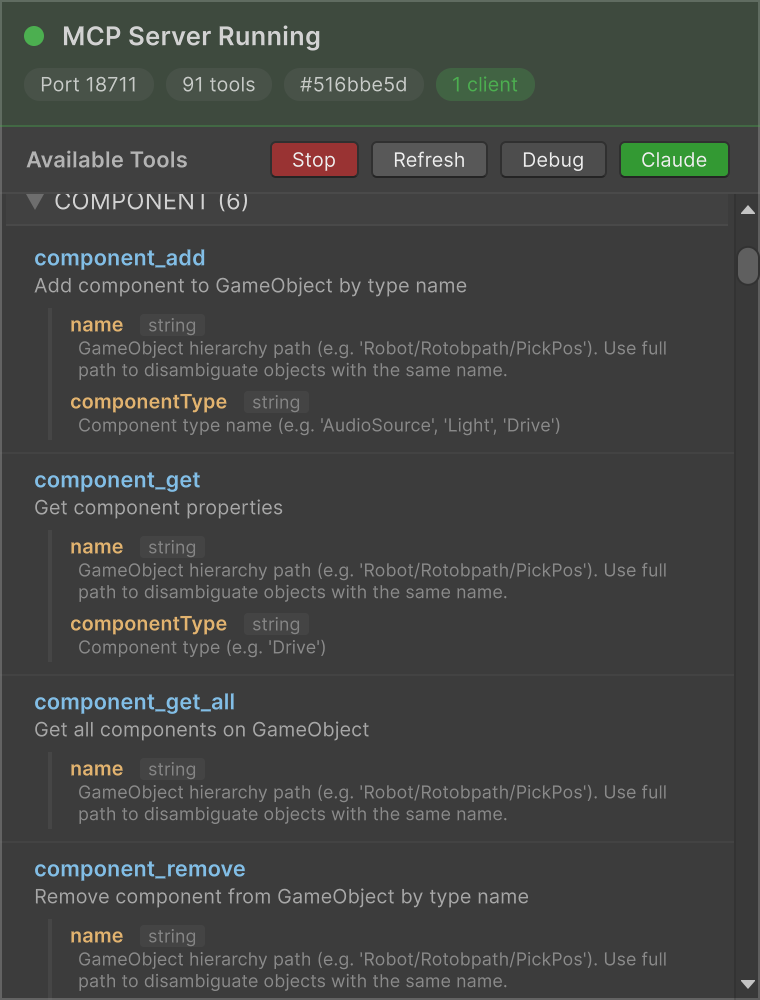
Tools panel showing available MCP tools with parameter descriptions
## General Unity Tools
These tools work with any Unity project:
### Simulation
| Tool | Description |
| --------------- | ---------------------------- |
| `sim_play` | Start simulation |
| `sim_stop` | Stop simulation |
| `sim_pause` | Pause simulation |
| `sim_resume` | Resume simulation |
| `sim_status` | Get current simulation state |
| `sim_set_speed` | Set simulation speed |
| `sim_reset` | Reset simulation |
### Scene
| Tool | Description |
| ---------------------- | ------------------------------- |
| `scene_hierarchy` | Get full scene hierarchy |
| `scene_find` | Find GameObjects by name |
| `scene_get_info` | Get active scene info |
| `scene_get_transform` | Get GameObject transform |
| `scene_get_components` | Get GameObject components |
| `scene_new` | Create new empty scene |
| `scene_list` | List all scene files in project |
### GameObjects
| Tool | Description |
| ------------------------------ | --------------------------------------- |
| `game_object_create` | Create a new empty GameObject |
| `game_object_create_primitive` | Create a primitive (Cube, Sphere, etc.) |
| `game_object_destroy` | Destroy a GameObject |
| `game_object_duplicate` | Duplicate a GameObject |
| `game_object_rename` | Rename a GameObject |
| `game_object_set_active` | Set active/inactive |
| `game_object_get_info` | Get GameObject info |
| `game_object_set_layer` | Set layer by name |
| `game_object_set_tag` | Set tag |
### Components
| Tool | Description |
| ------------------- | ------------------------------------- |
| `component_get` | Get component properties |
| `component_set` | Set component properties |
| `component_get_all` | Get all components on GameObject |
| `component_set_all` | Set properties on multiple components |
| `component_add` | Add component by type name |
| `component_remove` | Remove component by type name |
### Transforms
| Tool | Description |
| ------------------------ | ------------------------------ |
| `transform_set_position` | Set position |
| `transform_set_rotation` | Set rotation |
| `transform_set_scale` | Set scale |
| `transform_set_parent` | Set parent |
| `transform_translate` | Translate a GameObject |
| `transform_look_at` | Make GameObject look at target |
### Materials
| Tool | Description |
| ---------------------- | ----------------------------- |
| `material_set_color` | Set material color |
| `material_get_color` | Get material color |
| `renderer_set_enabled` | Set renderer enabled/disabled |
### Physics
| Tool | Description |
| -------------------------- | -------------------- |
| `physics_add_rigidbody` | Add Rigidbody |
| `physics_add_collider` | Add Collider |
| `physics_remove_rigidbody` | Remove Rigidbody |
| `physics_remove_colliders` | Remove all Colliders |
### Prefabs
| Tool | Description |
| -------------------- | ----------------------------- |
| `prefab_instantiate` | Instantiate a prefab |
| `prefab_find` | Find prefabs by name |
| `prefab_open` | Open prefab for editing |
| `prefab_save` | Save current prefab |
| `prefab_close` | Close prefab editor |
| `prefab_stage` | Get current prefab stage info |
### Editor
| Tool | Description |
| ----------------------- | ------------------------------ |
| `editor_save_scene` | Save current scene |
| `editor_undo` | Undo last operation |
| `editor_select` | Select GameObject in hierarchy |
| `editor_open_scene` | Open scene by path |
| `editor_focus` | Focus camera on GameObject |
| `editor_execute_menu` | Execute Unity menu item |
| `editor_invoke_method` | Invoke a static method |
| `editor_read_log` | Read console log |
| `editor_write_log` | Write to console log |
| `editor_clear_log` | Clear console log |
| `editor_recompile` | Recompile scripts |
| `editor_refresh_assets` | Refresh assets |
| `editor_get_status` | Get editor status |
| `editor_wait_ready` | Wait until editor is ready |
### Screenshots
| Tool | Description |
| ------------------- | -------------------------------- |
| `screenshot_editor` | Capture editor window screenshot |
| `screenshot_game` | Capture game view from camera |
| `screenshot_scene` | Capture scene view screenshot |
## realvirtual Digital Twin Tools
When used with the [realvirtual](https://realvirtual.io) framework, additional tools are available for industrial automation:
{% hint style="info" %}
The realvirtual digital twin tools will be available with the upcoming **realvirtual 6.3 LTS** release.
{% endhint %}
### Drives
| Tool | Description |
| -------------------- | ------------------------ |
| `drive_list` | List all drives in scene |
| `drive_to` | Drive to target position |
| `drive_jog_forward` | Jog drive forward |
| `drive_jog_backward` | Jog drive backward |
| `drive_stop` | Stop drive |
| `drive_set_speed` | Set drive speed |
### Sensors
| Tool | Description |
| --------------------- | --------------------------- |
| `sensor_list` | List all sensors in scene |
| `sensor_get` | Get sensor state |
| `sensor_get_occupied` | Check if sensor is occupied |
### PLC Signals
| Tool | Description |
| ------------------ | ------------------ |
| `signal_list` | List all signals |
| `signal_set_bool` | Set boolean signal |
| `signal_set_int` | Set integer signal |
| `signal_set_float` | Set float signal |
### Robot IK
| Tool | Description |
| ----------------- | ---------------------------- |
| `ik_get_state` | Get robot IK state |
| `ik_solve_target` | Solve IK for target position |
| `ik_verify_fk` | Verify forward kinematics |
---
# Agent Instructions
This documentation is published with GitBook. GitBook is the documentation platform designed so that both humans and AI agents can read, navigate, and reason over technical content effectively. Learn more at gitbook.com.
## Querying This Documentation
If you need additional information that is not directly available in this page, you can query the documentation by asking a question.
Perform an HTTP GET request on the following URL with the `ask` and `goal` query parameters:
```
GET https://doc.realvirtual.io/extensions/mcp-server/built-in-tools.md?ask=&goal=
```
`ask` is the immediate question: it should be specific, self-contained, and written in natural language.
`goal` is what the user is ultimately trying to achieve, the reason they need the answer. Sharing it helps GitBook give you a better, more relevant answer. A goal is most helpful when it describes the outcome the user wants rather than restating the question. For example, with `ask=how do I create an API token`, a goal like `automate deployments from our CI pipeline` lets GitBook tailor the answer to that use case.
The response will contain a direct answer to the question and relevant excerpts and sources from the documentation.
Use this mechanism when the answer is not explicitly present in the current page, you need clarification or additional context, or you want to retrieve related documentation sections.