> For the complete documentation index, see [llms.txt](https://doc.realvirtual.io/llms.txt). Markdown versions of documentation pages are available by appending `.md` to page URLs; this page is available as [Markdown](https://doc.realvirtual.io/components-and-scripts/picking-and-placing-mus/grip.md).
# Grip
{% hint style="info" %}
The Grip component was redesigned in realvirtual **6.3** with a new Simple Mode / Advanced Mode interface. If you are upgrading from 6.0, enable **Advanced Mode** to access the legacy properties you are familiar with.
{% endhint %}
## Overview
The Grip component picks and places [MUs (Movable Units)](/components-and-scripts/mu-movable-unit.md) using automation signals or [LogicSteps](/components-and-scripts/defining-logic/logicsteps.md). It is essential for attaching MUs to grippers, robot end-effectors, or any moving component driven by a drive system.
Grip offers two Inspector modes:
* **Simple Mode** (default) — streamlined interface for the most common pick-and-place scenarios
* **Advanced Mode** — reveals all properties for sensor-based detection, cylinder-based picking, and fine-grained placement control
## Simple Mode
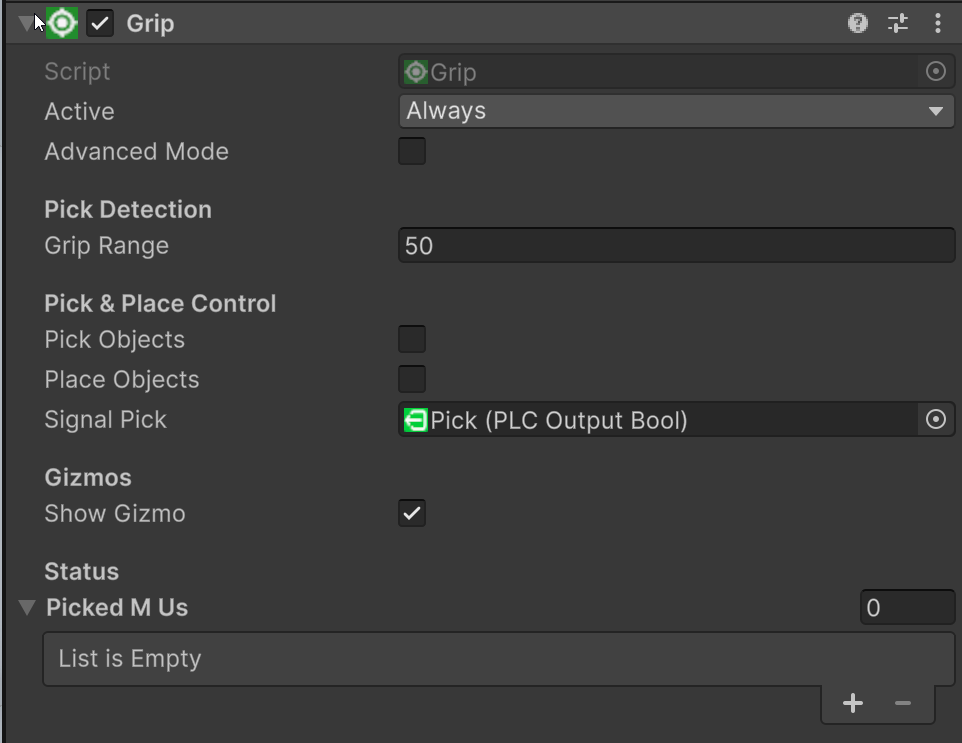
Grip in Simple Mode
In Simple Mode, Grip uses an **OverlapSphere** with the configured **Grip Range** to automatically find the nearest MU. No sensor is required — just position the Grip near the MU and trigger a pick.
### How Picking Works
When **Pick Objects** changes from `false` to `true` (or **Signal Pick** receives a positive flank), the Grip performs an OverlapSphere at its position with the **Grip Range** radius. Only objects on the `rvMU` physics layer are detected. The nearest free MU (not already held by another Grip or Fixer) is selected.
The picked MU becomes a **child of the Grip GameObject** in the hierarchy. Its Rigidbody is set to kinematic — physics and gravity are turned off so the MU moves rigidly with the gripper. The MU appears in the **Picked MUs** list.
### How Placing Works
When **Pick Objects** changes back to `false` (or **Signal Pick** receives a negative flank), the Grip releases all held MUs. In Simple Mode, the **Auto** placement cascade runs automatically:
1. **GripTarget** — Searches for a free [GripTarget](/components-and-scripts/picking-and-placing-mus/griptarget.md) within 500 mm. If found, the MU snaps to the target's position/rotation and becomes its child. Physics stays off.
2. **MU below** — Raycasts downward (up to 1000 mm). If another MU is hit, the released MU is loaded onto it as a child. Physics stays off.
3. **TransportSurface below** — If the raycast hits a transport surface (conveyor), the MU is released with **physics enabled** — it falls onto the conveyor and is transported.
4. **Nothing found** — The MU stays frozen at its current position (kinematic, no physics).
This cascade means Simple Mode handles the most common scenarios automatically — placing on a GripTarget, stacking parts on other MUs, dropping onto conveyors, or holding in position.
{% hint style="info" %}
In Simple Mode, the **Place Mode** is always **Auto** and the search/raycast distances use their defaults (500 mm / 1000 mm). Switch to **Advanced Mode** to change the placement behavior or adjust these distances.
{% endhint %}
### Properties
**Active** (enum) Controls when this component is active in the simulation (Always, Edit Mode only, etc.).
**Advanced Mode** (boolean) Toggle to reveal all properties. When unchecked, only the essential Simple Mode properties are shown.
**Grip Range** (float) The detection radius in millimeters. Grip uses a sphere overlap to find the nearest MU within this range. Default: 10 mm.
**Pick Objects** (boolean) Set to `true` to pick the nearest MU within the Grip Range. Reacts on the rising edge only (false → true).
**Place Objects** (boolean) Set to `true` to release all currently picked MUs. In Simple Mode this is automatically toggled when Pick Objects changes.
**Signal Pick** (PLCOutputBool) PLC signal to control picking. A positive flank (false → true) picks, a negative flank (true → false) places.
**Show Gizmo** (boolean) Displays the Grip Range sphere in the Scene view for visual debugging.
**Picked MUs** (list, read-only) Shows all MUs currently held by this Grip.
## Advanced Mode
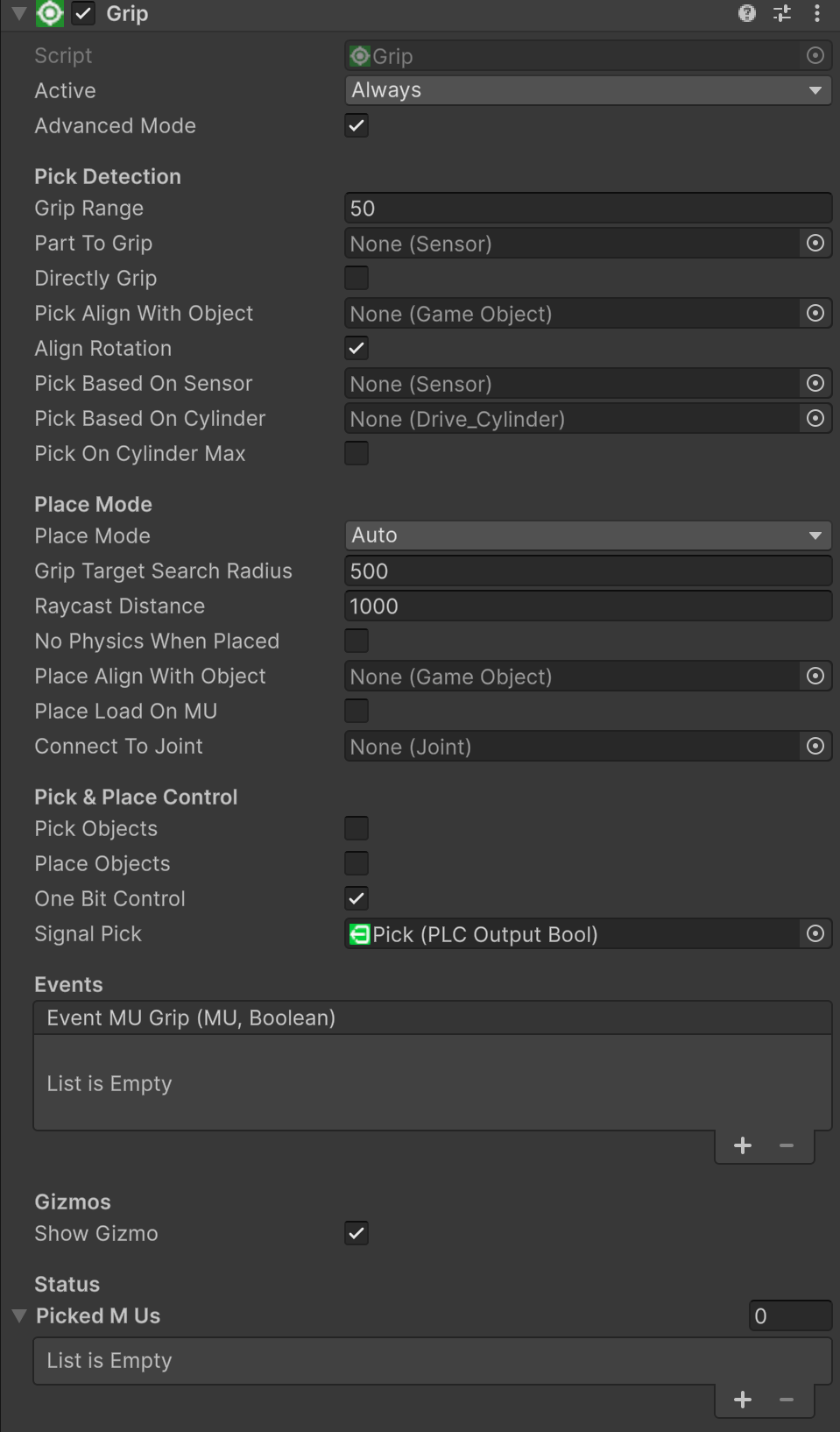
Grip in Advanced Mode
Enable **Advanced Mode** to access the full set of properties. This includes all Simple Mode properties plus the sections below.
### Pick Detection
**Part To Grip** (Sensor) Optional sensor to identify which MU to grip. When assigned, only MUs detected by this sensor are considered.
**Directly Grip** (boolean) If `true`, the MU is gripped immediately when the sensor detects it.
**Pick Align With Object** (GameObject) Aligns the MU pivot to this object's position and rotation before picking.
**Align Rotation** (boolean) Also aligns the rotation when picking (used with Pick Align With Object).
**Pick Based On Sensor** (Sensor) Picking starts when this additional sensor is occupied.
**Pick Based On Cylinder** (Drive\_Cylinder) Picking starts based on the position of a cylinder drive.
**Pick On Cylinder Max** (boolean) If `true`, picking starts when the cylinder reaches maximum position. If `false`, at minimum position.
### Place Mode
**Place Mode** (enum) Controls how MUs are placed when released:
* **Auto** — Runs the placement cascade described above (GripTarget → MU below → TransportSurface → kinematic fallback). Physics is only enabled when placing on a TransportSurface; all other placements keep the MU kinematic.
* **Static** — MU stays exactly where the gripper leaves it. Physics and gravity remain off (kinematic). The raycast cascade is skipped entirely.
* **Physics** — MU gets gravity and physics enabled on release and falls naturally. Velocities are reset to zero first so the MU does not fly away with the gripper's motion. The raycast cascade is skipped entirely.
**Grip Target Search Radius** (float) Detection range in millimeters for finding nearby [GripTargets](/components-and-scripts/picking-and-placing-mus/griptarget.md) during Auto placement. Default: 500 mm.
**Raycast Distance** (float) Distance in millimeters for the downward raycast used to detect surfaces and MUs below during Auto placement. Default: 1000 mm.
**No Physics When Placed** (boolean) Legacy property. If `true`, bypasses the Auto placement cascade and releases the MU with physics re-enabled at its current position.
**Place Align With Object** (GameObject) Aligns MU pivot to this object's position and rotation before releasing.
**Place Load On MU** (boolean) If `true`, the placed MU becomes a child of the MU it is placed on, creating a load-on-MU relationship.
**Connect To Joint** (Joint) Optional Unity Joint for physical joint-based gripping instead of hierarchy parenting.
### Pick & Place Control
**Pick Objects** (boolean) Set to `true` to pick MUs.
**Place Objects** (boolean) Set to `true` to place MUs.
**One Bit Control** (boolean) If `true`, a single signal toggles between pick and place. If `false`, separate signals for pick and place are used.
**Signal Pick** (PLCOutputBool) Signal to control picking (positive flank = pick).
**Signal Place** (PLCOutputBool) Signal to control placing (positive flank = place). Only used when One Bit Control is `false`.
### Events
**Event MU Grip** (UnityEvent) Triggered when an MU is gripped or released. Passes the MU and `true` for grip, `false` for release.
## GripTarget Integration
When **Place Mode** is set to **Auto**, the Grip automatically searches for [GripTarget](/components-and-scripts/picking-and-placing-mus/griptarget.md) components within the **Grip Target Search Radius**. If a free GripTarget is found, the MU snaps to the target's position and rotation and becomes a child of the GripTarget.
See [GripTarget](/components-and-scripts/picking-and-placing-mus/griptarget.md) for details on setting up placement slots.
## GripTarget vs Fixer
Both components handle MU placement, but serve different purposes:
| | GripTarget | Fixer |
| --------------------- | --------------------------------------- | ------------------------------------------------------------------ |
| **Purpose** | Passive placement slot ("parking spot") | Active station lock ("parking gate with lock") |
| **Needs Grip?** | Yes, always — only works with Grip | No — works standalone |
| **MU arrives how?** | Grip places it | Conveyor, AGV, or robot delivers it |
| **Controlled by** | Grip component logic | PLC signals (FixerFix/FixerRelease) or auto-mode |
| **Detection** | None — found by Grip's OverlapSphere | Own BoxCollider trigger or Raycast |
| **MU parenting** | MU becomes child of GripTarget | MU becomes child of Fixer (restored to previous parent on release) |
| **Multi-MU** | One MU per target | Multiple MUs via MUSFixed list |
| **Handover blocking** | No | Yes — prevents double-fixing between stations |
| **Tag filtering** | No | Yes — only fix specific part types |
**Use GripTarget** when a Grip (robot gripper) places MUs at predefined positions. **Use** [**Fixer**](/components-and-scripts/picking-and-placing-mus/fixer.md) when MUs arrive on their own (conveyor) and need to be stopped/held by PLC control.
## Demo Scenes
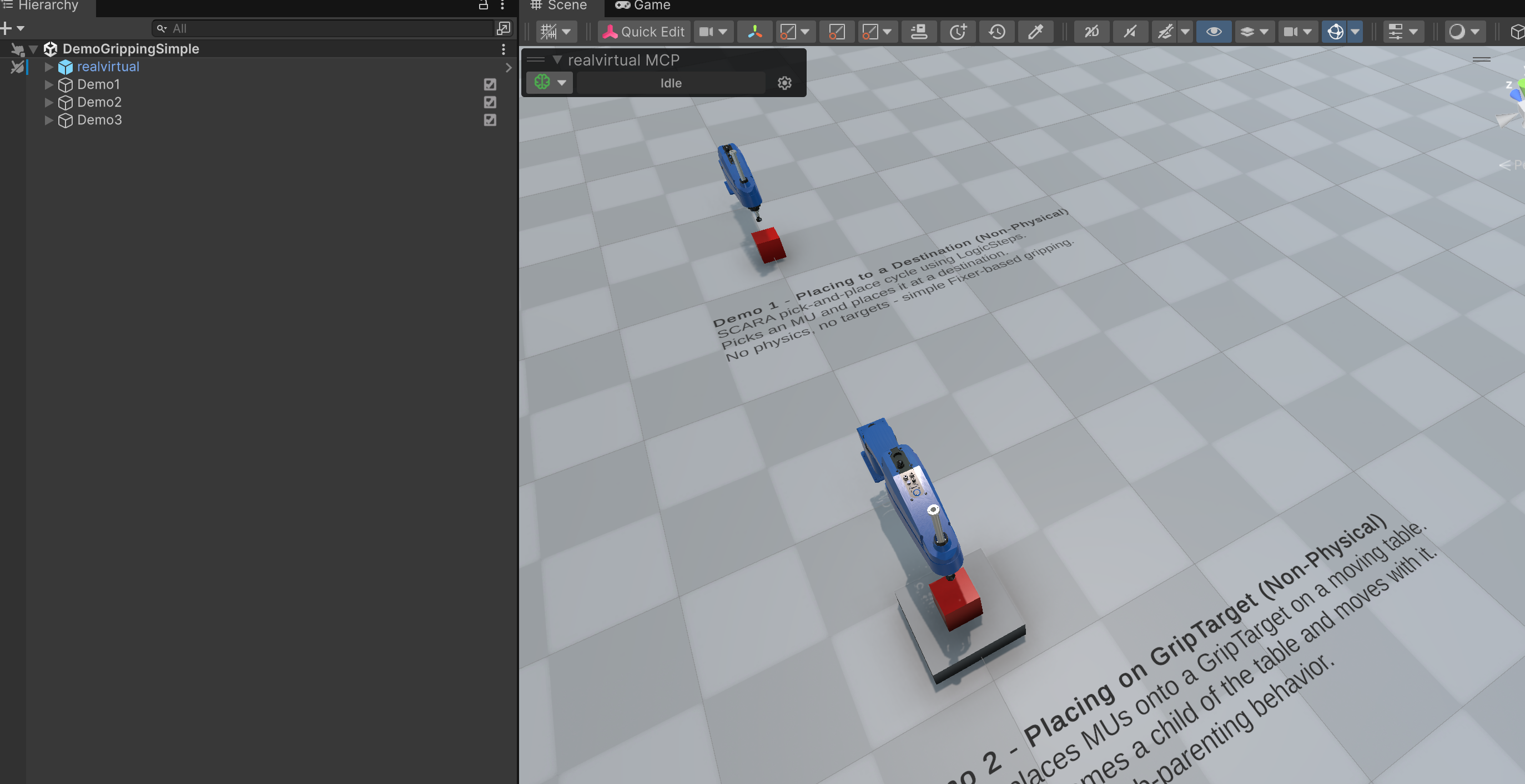
Grip demo scenes
Open the [Demo Scenes Browser](/basics/user-interface/demo-scenes-browser.md) and look under **Object Handling** for gripping demos:
* **DemoGrippingSimple** — three demos: simple pick/place with OverlapSphere, GripTarget placement, and physics-based placement
* **DemoGrippingAdvanced** — sensor-based detection, cylinder-based picking, and PLC signal control
## See Also
* [GripTarget](/components-and-scripts/picking-and-placing-mus/griptarget.md)
* [Gripper](/components-and-scripts/picking-and-placing-mus/gripper.md)
* [Fixer](/components-and-scripts/picking-and-placing-mus/fixer.md)
* [LogicSteps — GripPick & GripPlace](/components-and-scripts/defining-logic/logicsteps.md)
* [MU (Movable Unit)](/components-and-scripts/mu-movable-unit.md)
---
# Agent Instructions
This documentation is published with GitBook. GitBook is the documentation platform designed so that both humans and AI agents can read, navigate, and reason over technical content effectively. Learn more at gitbook.com.
## Querying This Documentation
If you need additional information that is not directly available in this page, you can query the documentation by asking a question.
Perform an HTTP GET request on the following URL with the `ask` and `goal` query parameters:
```
GET https://doc.realvirtual.io/components-and-scripts/picking-and-placing-mus/grip.md?ask=&goal=
```
`ask` is the immediate question: it should be specific, self-contained, and written in natural language.
`goal` is what the user is ultimately trying to achieve, the reason they need the answer. Sharing it helps GitBook give you a better, more relevant answer. A goal is most helpful when it describes the outcome the user wants rather than restating the question. For example, with `ask=how do I create an API token`, a goal like `automate deployments from our CI pipeline` lets GitBook tailor the answer to that use case.
The response will contain a direct answer to the question and relevant excerpts and sources from the documentation.
Use this mechanism when the answer is not explicitly present in the current page, you need clarification or additional context, or you want to retrieve related documentation sections.