> For the complete documentation index, see [llms.txt](https://doc.realvirtual.io/llms.txt). Markdown versions of documentation pages are available by appending `.md` to page URLs; this page is available as [Markdown](https://doc.realvirtual.io/components-and-scripts/machining-volume.md).
# Machining Volume (Pro)
**MachiningVolume** turns a GameObject into a machinable workpiece, removing material in real time as a **MachiningTool** passes through it.
{% hint style="info" %}
This feature was added in realvirtual **6.3.5** (Professional)
{% endhint %}
## Overview
MachiningVolume simulates real-time material removal for virtual commissioning of CNC milling, drilling and grinding applications. Internally it represents the workpiece as a voxel-based stock: as one or more MachiningTool objects move through the volume, material is subtracted continuously and the visible mesh is rebuilt as a watertight, closed surface - no pre-baked cut animations, no scripted geometry swaps.
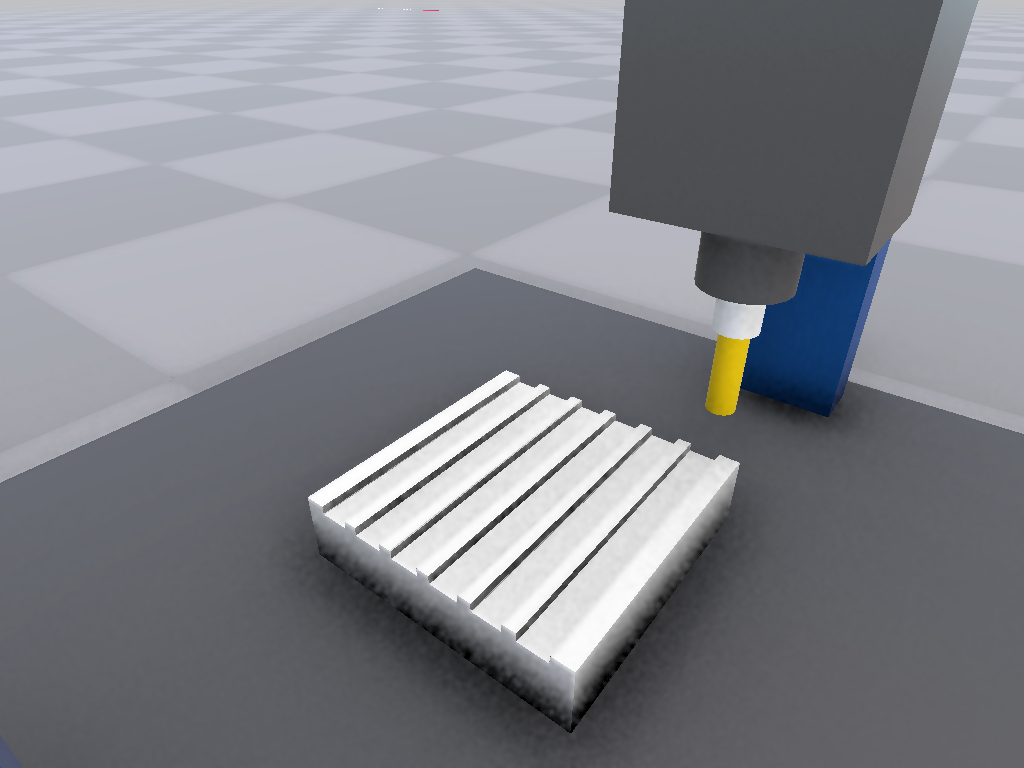
A 3-axis gantry mill cutting serpentine grooves into an aluminum block with MachiningVolume
Use MachiningVolume together with **Drive** components to move the tool along the real machining path, and connect PLC signals to reset and monitor the process exactly as on a real CNC control.
## Transform Requirement
The machining pipeline needs a **rigid workpiece transform**: tool radii are real millimeters and the machined surface is rebuilt unscaled. MachiningVolume therefore bakes any transform scale into the stock geometry when the simulation starts and resets the transform to scale 1. The displayed size does not change - a scaled Unity primitive machines exactly as you see it in the Scene view.
This has one consequence worth knowing before you build the workpiece:
* **Box, Sphere and Capsule colliders** on the same GameObject are adjusted automatically and keep their world size. Nothing to do.
* **A Mesh Collider** cannot be adjusted - its geometry lives in a shared mesh asset that must never be rewritten, because every other object using that mesh would change with it. It shrinks by exactly the baked scale factor, so the volume reports it with a warning in the Console and the Inspector shows the same warning while you are still authoring the scene.
To resolve the warning, either replace the Mesh Collider with a Box, Sphere or Capsule collider carrying the real dimensions at scale 1 - the Inspector prints the exact numbers - or move the Mesh Collider to a **child** GameObject, which the volume never touches.
Colliders on child objects and a scaled **parent** hierarchy are outside this mechanism: keep the parents of a machining volume unscaled for exact results.
## Properties
### Workpiece Settings
**Grid Resolution** (Vector3Int) Voxel grid resolution along X, Y and Z (for example 64 x 64 x 64). Higher resolution produces finer, smoother cut surfaces but increases memory use and mesh rebuild cost - start low and increase only where the extra detail is visible.
**Workpiece Size** (millimeters) The size of the workpiece stock along X, Y and Z, used for the Box and Cylinder shapes.
**Shape** (enum: Box / Cylinder / Mesh) The starting stock shape. **Box** creates a rectangular block spanning Workpiece Size. **Cylinder** creates a capped cylinder inscribed in Workpiece Size, oriented along **Cylinder Axis**. **Mesh** voxelizes any closed, watertight mesh into the stock - use this to machine arbitrary CAD parts instead of a primitive shape.
**Cylinder Axis** (enum: X / Y / Z) The axis a Cylinder workpiece lies along. X or Z produces a lying (horizontal) cylinder, Y produces an upright cylinder. Only used when Shape is Cylinder.
**Stock Mesh** (Mesh) The source mesh for Shape = Mesh. Leave empty to machine the mesh already assigned to the workpiece's Mesh Filter (what you see is what gets machined). The mesh must be closed and readable, and any transform scale on the GameObject is baked into the stock automatically, so a scaled Unity primitive machines exactly as displayed - see [Transform Requirement](#transform-requirement) for what this means for colliders.
### Tools
**Tools** (list) The MachiningTool objects that subtract material from this volume every simulation tick, evaluated in list order. Assign tools directly, or let **Tool Group** discover them automatically.
**Tool Group** (string) An optional realvirtual Group name. Any object carrying a MachiningTool component and this group is added to Tools automatically, including MUs spawned at runtime - useful for tool-changer setups or machining stations fed by a Source. Leave empty to use only the explicit Tools list.
**Sweep Tool Motion** (boolean) When enabled, the volume subtracts the swept path of each tool between simulation steps instead of only its end position, so fast tool motion still cuts a continuous groove rather than a series of disconnected dents.
**Max Sweep Substeps** (integer) The maximum number of tool poses sampled along the swept motion path per simulation step, per tool. Raise this if very fast tool moves leave visible gaps in the cut; lower it to save performance.
### Mesh Output
**Meshing** (enum: MarchingCubes / DualContouring) The surface reconstruction algorithm. **MarchingCubes** is the robust default with slightly rounded edges. **DualContouring** (experimental) produces sharper edges and corners, at higher computational cost.
**Crease Angle** (degrees) The hard-edge threshold used by Dual Contouring: surface normals that diverge by more than this angle get a sharp, unsmoothed edge instead of a rounded one. Set to 0 to disable and always smooth-shade.
**Generate UVs** (boolean) Generates UV coordinates on the machined surface using triplanar projection, so materials with textures map correctly onto newly cut faces.
**Statistics Interval** (seconds) How often the **Material Remaining Percent** and **Voxels Modified** statistics in the Inspector are refreshed.
### Signals / IOs
**Signal Spindle On** (PLC output) While false, no material is removed - use this to simulate the spindle being switched off.
**Signal Reset** (PLC output) A rising edge restores the workpiece to its original, unmachined state - wire this to a "load new blank" or "cycle reset" step in your control logic.
**Signal Machining Active** (PLC input) True while material is actively being removed or the mesh is still catching up with recent cuts - use it as a busy/in-cycle indicator.
### Status (read-only)
**Material Remaining Percent** The percentage of the original stock volume still present.
**Voxels Modified** The number of voxels removed since the workpiece was last initialized or reset.
## Quick Start
1. Add a **MeshFilter** and **MeshRenderer** to your workpiece GameObject (a Unity primitive works, or your own CAD stock mesh).
2. Add the **MachiningVolume** component and choose a **Shape** - Box, Cylinder, or Mesh for a custom CAD stock.
3. Add a **MachiningTool** component to the object representing your cutter, and set its shape and dimensions.
4. Drag the tool into the **Tools** list of the MachiningVolume (or assign a matching **Tool Group** instead).
5. Move the tool through the workpiece with a **Drive** and press Play - material is removed live as the tool passes through.
## Common Use Cases
* **CNC Milling Virtual Commissioning** - Validate a real milling program's tool path and cycle time against a live 3D representation of the finished part.
* **Robot Deburring / Grinding** - Simulate a robot-mounted grinding or deburring tool removing material along a programmed path.
* **PLC-Driven Machining** - Drive the spindle and axes from a real PLC interface, using **Signal Reset** and **Signal Machining Active** for cycle control exactly as on the real machine.
* **Arbitrary CAD Stock Machining** - Machine an imported CAD part directly using Shape = Mesh, instead of approximating it with a Box or Cylinder.
## See Also
* [Machining Tool](/components-and-scripts/machining-tool.md) - Defines the cutter geometry that removes material from a MachiningVolume
* [Drive](/components-and-scripts/motion/drive.md) - Move the tool along the real machining path
---
# Agent Instructions
This documentation is published with GitBook. GitBook is the documentation platform designed so that both humans and AI agents can read, navigate, and reason over technical content effectively. Learn more at gitbook.com.
## Querying This Documentation
If you need additional information that is not directly available in this page, you can query the documentation by asking a question.
Perform an HTTP GET request on the following URL with the `ask` and `goal` query parameters:
```
GET https://doc.realvirtual.io/components-and-scripts/machining-volume.md?ask=&goal=
```
`ask` is the immediate question: it should be specific, self-contained, and written in natural language.
`goal` is what the user is ultimately trying to achieve, the reason they need the answer. Sharing it helps GitBook give you a better, more relevant answer. A goal is most helpful when it describes the outcome the user wants rather than restating the question. For example, with `ask=how do I create an API token`, a goal like `automate deployments from our CI pipeline` lets GitBook tailor the answer to that use case.
The response will contain a direct answer to the question and relevant excerpts and sources from the documentation.
Use this mechanism when the answer is not explicitly present in the current page, you need clarification or additional context, or you want to retrieve related documentation sections.