# Innoactive

The realvirtual Streaming Platform (powered by Innoactive technology) enables you to publish and stream your Digital Twin to desktop browsers and VR headsets without requiring users to download or install anything. Users simply access a URL to interact with your simulation in real-time.

<figure><img src="/files/aFrf5tz6NPlXaRSU3h6r" alt="realvirtual Demo Scene streaming in Innoactive"><figcaption><p>realvirtual industrial simulation running in Innoactive cloud streaming platform</p></figcaption></figure>

## Overview

The realvirtual Streaming Platform hosts your Windows builds in the cloud and streams them to end users via their browser or VR headset. All compute processing happens on the cloud servers, so users can access complex industrial simulations even on lightweight devices. The platform provides a complete content management system for uploading, organizing, and sharing your digital twins.

### How It Works

1. **Upload** - Build your Digital Twin as a Windows executable and upload it to the realvirtual Streaming Platform
2. **Host** - Your application runs on cloud servers with full processing power
3. **Stream** - Users access your simulation through a simple URL in their browser or VR headset
4. **Interact** - Real-time interaction with mouse, keyboard, touch, or VR controllers

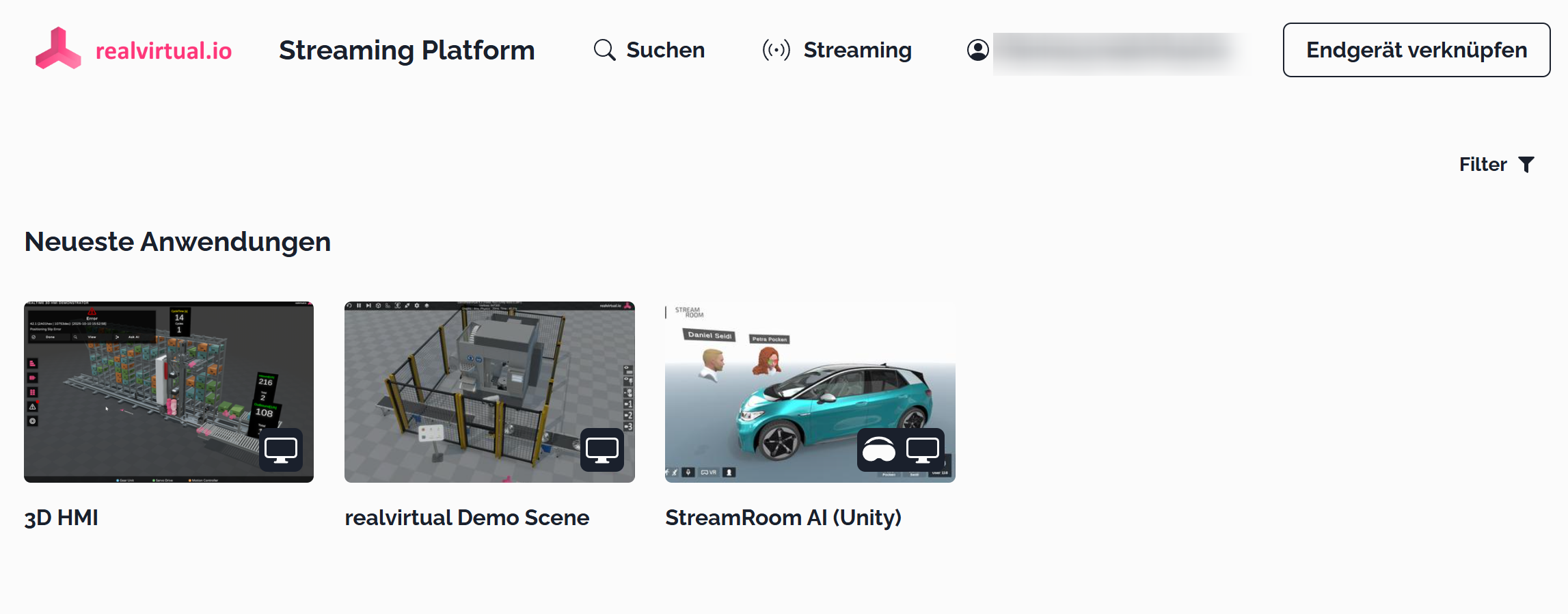
The streaming platform shows your uploaded applications in a gallery view where users can browse and launch different scenes and experiences.

<figure><img src="/files/4cBYO78JMzrZY5ThnY1r" alt="Innoactive Streaming Platform gallery view"><figcaption><p>Innoactive Streaming Platform showing uploaded applications including realvirtual demos, 3D HMI, and other Unity projects</p></figcaption></figure>

### Key Innoactive Capabilities

**Windows Build Hosting:**

* Upload and host your Windows builds in the cloud
* No installation required for end users
* Automatic updates and version management
* Enterprise-grade content management system (CMS)

**XR Cloud Streaming:**

* Stream to Meta Quest, Vive Focus, Apple Vision Pro
* Desktop browser access without plugins
* Remote compute processing for complex simulations
* Low-latency streaming technology

**Enterprise Deployment:**

* Training deployment to employees, customers, and suppliers
* Product showrooms and sales demonstrations
* Industrial design reviews and planning
* Scalable cloud infrastructure

**Industry Applications:**

* Manufacturing process training and visualization
* Equipment operation simulation
* Facility planning and digital twin reviews
* Remote collaboration and demonstrations

### realvirtual Integration

realvirtual Professional integration with Innoactive enables:

* Upload Windows builds of your Digital Twin to the cloud
* Stream interactive simulations to VR headsets and browsers
* Remote access to complex industrial models without local installation
* Multi-user collaborative experiences
* Easy distribution to customers and partners worldwide

## Innoactive Resources

For more information about Innoactive, visit:

* [Innoactive Official Website](https://www.innoactive.io/) - XR Streaming platform
* [Innoactive Portal](https://www.innoactive.io/) - Enterprise XR CMS documentation

## Alternative VR Solutions

While Innoactive documentation is being prepared, consider these VR development options:

* [VR Builder](/extensions/vr-builder.md) - Open-source VR training creation
* [Mixed Reality with Meta Quest3](/advanced-topics/mixed-reality-with-meta-quest3.md) - Direct Meta Quest integration
* [Industrial Metaverse](https://github.com/game4automation/doc/blob/doc/extensions/realvirtual.io-industrial-metaverse) - Multi-user VR/AR solutions

## Related Publishing Options

* [Windows Publishing](/basics/publishing-the-digital-twin/windows.md) - Standalone Windows executables
* [WebGL Publishing](/basics/publishing-the-digital-twin/webgl.md) - Browser-based deployment
* [CMC ViewR](/basics/publishing-the-digital-twin/cmc-viewr.md) - Advanced 3D visualization platform

## See Also

* [VR Modules](/extensions/realvirtual.io-industrial-metaverse/vr-modules.md) - VR interaction components
* [AR Modules](/extensions/realvirtual.io-industrial-metaverse/ar-modules.md) - Augmented reality features
* [Scene Interaction](/components-and-scripts/scene-interaction.md) - Interactive elements

© 2025 realvirtual GmbH [https://realvirtual.io](https://realvirtual.io/) - All rights reserved.


---

# Agent Instructions: Querying This Documentation

If you need additional information that is not directly available in this page, you can query the documentation dynamically by asking a question.

Perform an HTTP GET request on the current page URL with the `ask` query parameter:

```
GET https://doc.realvirtual.io/basics/publishing-the-digital-twin/innoactive.md?ask=<question>
```

The question should be specific, self-contained, and written in natural language.
The response will contain a direct answer to the question and relevant excerpts and sources from the documentation.

Use this mechanism when the answer is not explicitly present in the current page, you need clarification or additional context, or you want to retrieve related documentation sections.